


Legacy View
4.6159.00 Reviews
App Specs
- Version
- 6.18.2
- Updated On
- License
- Free
- Downloads
- 50,000+
- Developer
- Chandler Systems
- Categories
- House & Home
- Platform
- Android
Screenshots
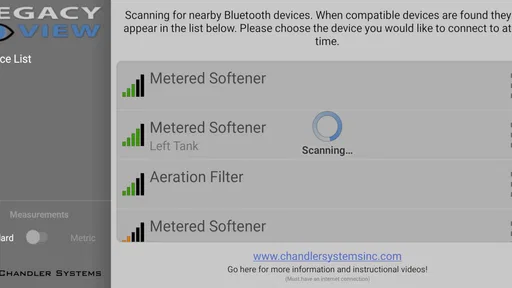
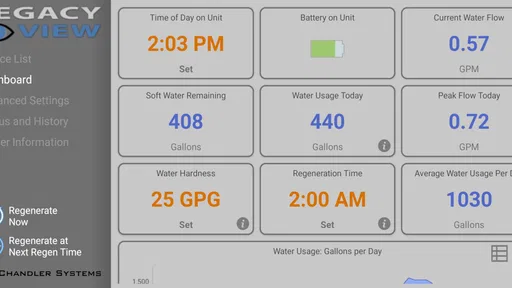
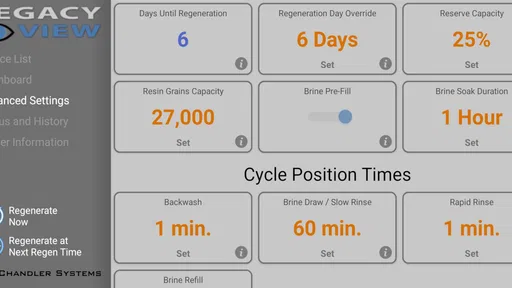
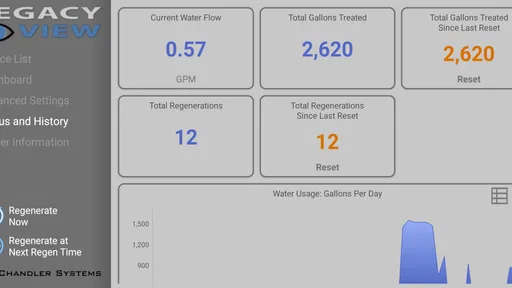
 Analysis by AppCompare
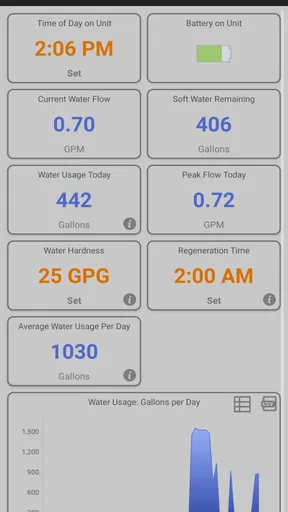
Managing a home water treatment system is usually the kind of task I remember only when something feels wrong: water quality changes, a service reminder appears, or I wonder whether the equipment is working as expected. Legacy View, developed by Chandler Systems, is built for that narrow but useful moment. It is a free House & Home app that gives information and control for a compatible Chandler Systems water treatment system, rather than trying to become a general smart-home dashboard.
That focus is both its main attraction and its biggest boundary. If your home uses a Chandler Systems setup, the app can put useful system information closer at hand than a paper manual, a visit to the basement, or a call to an installer. If you do not have compatible equipment, there is little reason to keep it installed. I approached it as a practical control companion, not as a standalone water-testing tool, and that distinction matters before downloading.
What to consider before choosing Legacy View
My first decision criterion would be compatibility. This is not an app for monitoring a random water softener, checking municipal water quality, or replacing professional maintenance. Its purpose is tied to a Chandler Systems water treatment system. That makes the ownership question more important than the app’s general appearance: the right user is someone whose equipment belongs to that ecosystem and who wants a convenient way to understand or control it.
The second criterion is how often you need access to system information. Someone who rarely thinks about water treatment may be satisfied with the controls on the equipment itself and a service contact. On the other hand, a homeowner who wants to check the system without walking to the utility room, or who shares responsibility for maintenance with another household member, has a more convincing reason to use it.
I also think about the difference between information and control. An app can be helpful when it makes the current state easier to understand, but control features deserve more care. Changing a setting from a phone is convenient, yet it also means the user should know what that setting does and when a change is appropriate. I would use Legacy View to make routine interaction easier, not as an excuse to adjust unfamiliar treatment settings casually.
The app is free, carries an Everyone content rating, and supports devices running Android 6.0 or later. Those details make it approachable for a wide range of household phones, including older devices that may not run many current apps comfortably. Still, the operating-system requirement is only one part of the decision. The treatment equipment and its connection to the app are the real prerequisites.
A focused companion instead of a general smart-home hub
Compared with a general smart-home application, Legacy View has a much narrower job. A broad home-control app may bring lighting, cameras, thermostats, and appliances into one place, but it is not necessarily designed around the details of a water treatment system. Legacy View’s value comes from that specialization. I would rather use a focused tool that understands the equipment I own than force a generic dashboard to represent it in an oversimplified way.
Worth Reading Before You Choose

EA SPORTS FC Mobile 26 Is a Bigger Football Game, but It Takes Time

Flipboard Shows What News Apps Must Do Beyond the Feed

Switching to Android Auto Means Rethinking Your Driving Routine

Google Calendar Makes a Crowded Week Easier to Manage

Ludo King Makes the Most of the Minutes Between Plans

Baby Panda World Brings Quick Play to Modern Phones, but Its Game Library Feels Busy
Compared with using the physical controls on the treatment unit, the trade-off is different. The equipment remains the direct, dependable point of interaction, especially when I am already standing beside it. The app becomes more useful when I am elsewhere in the house or when another person needs access to the same information. It is not automatically better than the controls; it is better in situations where distance and convenience are the problem.
Compared with contacting a service professional, the app is best for routine awareness and ordinary interaction, not diagnosis of every possible problem. A phone screen can help me notice what the system is reporting, but it cannot turn me into a water-treatment technician. I would still treat unusual behavior, leaks, persistent quality concerns, or confusing system messages as reasons to seek qualified help rather than repeatedly changing settings.
Why the narrow focus can be a real advantage
One strength I noticed in this type of product is that it gives the water treatment system a clearer place in the homeowner’s routine. These systems are easy to ignore because they operate in the background. A dedicated companion can make them more visible without requiring a full smart-home setup. That is particularly useful for people who manage a property remotely in practical ways, such as checking household equipment before guests arrive or helping an older family member keep track of routine operation.
There is also a useful division of labor between the app and the physical installation. I would use the app for a quick check and the equipment itself for anything that requires seeing hoses, salt, drainage, or the surrounding area. That workflow avoids a common mistake: assuming that a normal-looking app screen proves the entire installation is healthy. Water treatment is still a physical system, and the phone is only one view of it.
Another non-obvious benefit is shared household awareness. If one person normally handles the utility room, everyone else may have trouble answering simple questions about the system. A control companion can reduce that knowledge gap. It gives a second person a starting point for understanding what the system is doing, while the owner can reserve technical changes for situations where they are confident about the consequences.
Practical routines that make the app worthwhile
My preferred routine would be brief and consistent rather than constant checking. After installing or connecting the app, I would first identify the information it presents and learn which controls are safe for ordinary household use. I would then compare what I see with the physical equipment once, so I know that the app is associated with the intended system. That initial check is more valuable than opening the app repeatedly without knowing what normal operation looks like.
A useful everyday scenario is returning home after being away. Instead of immediately inspecting the utility area, I could use the app as a first check on the treatment system. If everything appears ordinary, I can continue with the rest of the house. If something looks unfamiliar, I have a reason to inspect the equipment directly. This does not replace a physical check, but it helps me decide where to spend attention.
I would also use it before arranging service. The best preparation is not to make random adjustments; it is to note what the system is showing and describe the change clearly. If the app presents information that helps identify the situation, that can make a conversation with a technician more efficient. The practical insight here is to treat the app as a record of what you observed, not as a substitute for professional interpretation.
For a rental property or a second home, the value can be even more situational. A caretaker may be able to check the treatment system without entering the house immediately, while the owner remains aware of the equipment’s status. I would only recommend this arrangement when the people involved understand which actions are routine and which should be left alone. Remote convenience is useful, but unclear responsibility can create more trouble than the app solves.
Where Legacy View is likely to win
Legacy View wins when the main problem is access to a compatible Chandler Systems water treatment system. Its free price removes a financial barrier for owners who already have the equipment, and the app’s purpose is easy to explain: keep system information and control available through a mobile device. That is a more direct fit than buying or configuring a broad home-automation product simply to cover one specialized appliance.
It also wins for users who prefer a dedicated interface over a manual or a service-only relationship. I like the idea of being able to check the system in the same place where I handle other everyday phone tasks, provided I remember that the app is an aid rather than a complete maintenance program. The combination of a focused purpose and no purchase price makes it reasonable to try for eligible owners.
The public response is encouraging without being a reason to ignore compatibility. Legacy View has an average rating of 4.6 from around 1.2 thousand ratings, with more than a hundred written reviews, and it has passed the 50-thousand-install mark. I read those figures as signs that the app has found a real audience, not as proof that every installation will behave identically. The experience still depends heavily on the treatment system, the phone, and the user’s expectations.
Its long presence also gives it a particular role. The app was released on October 20, 2015, and the current version is 6.18.2. For me, that suggests an established companion rather than a brand-new experiment. It also means I would pay attention to how comfortably it runs on my device and whether the current experience feels clear enough for occasional household use. A mature app can be reassuring, but age alone does not guarantee that every screen will feel modern.
Where another approach may fit better
I would look elsewhere if I wanted one app to manage many unrelated home systems. Legacy View is not the natural choice for someone whose priority is a single dashboard for an entire smart home. In that situation, a broader platform may be easier to live with, even if it offers less specialized attention to water treatment. The deciding factor is whether the user values system-specific access more than having everything together.
I would also skip it if I do not own a compatible Chandler Systems installation. Installing an app without the corresponding equipment does not create a water-monitoring solution. For general water concerns, the better path may involve the equipment manufacturer, a qualified installer, local water information, or physical testing, depending on the question. Legacy View should not be judged as a universal answer to those separate needs.
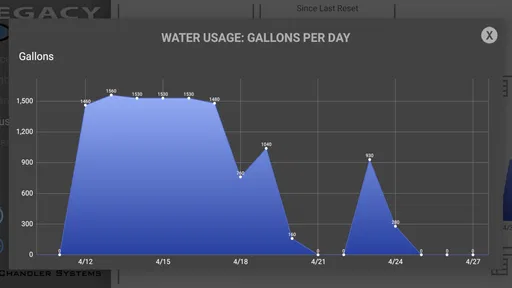
Users who want detailed historical analysis may need to set expectations carefully. I would not choose a dedicated equipment companion solely because I hope it will behave like a full analytics platform. The important question is whether the information and controls it provides are enough for routine ownership. If the goal is laboratory-style water measurement, long-term household consumption analysis, or a complete maintenance log, a different tool or professional process may be more suitable.
There is also a human-factors limitation. A family member who is uncomfortable with technical controls may find a phone interface less reassuring than a simple explanation beside the equipment. In that case, the app helps only if someone takes time to show what the information means. Convenience does not remove the need for shared understanding, especially when a setting can affect how the treatment system operates.
The real cost of switching to an app-based routine
Because the app is free, the main cost is not money. It is the small amount of time needed to install it, connect it to the intended system, learn the interface, and decide who should use which controls. That is a low cost for many owners, but it is still worth acknowledging. A tool that is installed and forgotten does not improve household maintenance.
There is also a habit cost. If I move from physical checks or phone calls to app-based checks, I need to remember that digital information is only one layer of awareness. My routine should still include sensible attention to the equipment and the surrounding area. The best transition is gradual: use the app for convenience, compare it with direct observation, and avoid changing settings until I understand the result.
Switching phones or involving a new household user may require another round of setup and explanation. I would keep the process orderly by deciding who is responsible for technical decisions and who is simply checking information. That simple distinction prevents a common household problem in which several people assume someone else is watching the system, or several people make changes without communicating.
The minimum operating-system requirement is friendly to older Android devices, but I would still judge the experience on the phone I actually plan to use. A device that technically qualifies may not be the most comfortable one for occasional home management. If the app feels difficult to read or navigate on that phone, the physical controls and a clear maintenance arrangement may be preferable.
My recommendation for the right owner
I recommend Legacy View to owners of a Chandler Systems water treatment system who want a free, focused way to access system information and control from a phone. I especially see the value for households where the equipment is out of the way, more than one person needs awareness, or the owner wants a quick first check before inspecting the utility area.
I would approach it as a companion, not a replacement for the installation, the owner’s manual, or qualified service. Before relying on it, I would confirm that it is connected to the correct equipment, learn the difference between viewing information and changing a setting, and establish a simple household rule for technical adjustments. Those steps turn a convenient download into a safer routine.
For everyone else, the recommendation is straightforward: choose based on the system you own, not on the app category alone. A general smart-home platform may be better for broad device management, while professional help or physical testing may be better for water-quality questions. Legacy View makes the most sense when its specific equipment connection matches your actual household need.
After weighing convenience against its narrow compatibility, I see Legacy View as a sensible utility for the right audience rather than an app everyone needs. Its strongest quality is focus: it brings Chandler Systems water treatment information and control into an everyday device without charging for the app. If that is exactly the gap in your current routine, I would install it and build a modest, careful checking habit around it. If not, skipping it is not a missed opportunity; it simply means another kind of tool is a better match.
Pros
- Simple interface makes browsing legacy content easy.
- Quick access to saved or archived items.
- Lightweight design should run well on older devices.
- Useful for users who prefer a classic viewing experience.
- Minimal distractions keep attention on the available content.
Cons
- Limited modern features may feel restrictive for some users.
- Navigation can seem dated compared with newer apps.
- Content availability may vary by device or region.
- May offer few customization options for advanced users.
- Updates and support may be less frequent than mainstream apps.
FAQs for Legacy View
What is Legacy View and what can I use it for?
Legacy View is a dedicated viewing and management application designed to work with compatible security cameras, DVRs, or monitoring systems. After installation, it can let you view live video, check connected channels, review recorded footage, and monitor activity remotely. Its exact features depend on the Legacy hardware and service connected to your account, so it is important to confirm compatibility before downloading.
Is Legacy View compatible with my Android or iPhone device?
Legacy View may be available for supported Android and iOS devices, but compatibility can vary according to the operating-system version, device model, and the specific Legacy security equipment you own. Before installing it, check the app-store listing for current requirements and verify that your recorder or camera system is supported. Older hardware may require a particular app version or configuration.
Do I need Legacy security equipment or an account to use the app?
Yes, Legacy View is generally intended to connect with compatible Legacy surveillance equipment rather than function as a standalone camera application. You may need a configured DVR, NVR, camera system, or monitoring account, along with login details and network access. Without supported hardware or valid credentials, many of the app’s viewing and playback functions may not be available.
Can I watch live footage and recorded video through Legacy View?
The app is designed primarily for remote surveillance, so compatible systems may allow you to watch live camera feeds and access previously recorded video. Available controls can include switching channels, changing viewing layouts, taking snapshots, or searching recordings. Performance depends on the recorder, camera configuration, internet connection, and permissions assigned to your account.
Is Legacy View safe to download and what should I check before installing it?
Download Legacy View only from the official Google Play Store or Apple App Store, and check the publisher name, recent update history, ratings, and requested permissions before installation. Because the app may handle camera feeds and account information, use a strong password and secure network connection. Also review its privacy policy and avoid sharing login credentials with unauthorized people.


